The newest generation of Wi-Fi, the one reaching shops this year, is not one bit faster than the last one. For the first time in almost 30 years, a new Wi-Fi standard is not selling more speed, and that is the best thing to happen to home networking since the router itself. This guide explains every Wi-Fi standard from the 1997 original to Wi-Fi 8, in plain language, with the one physics rule that makes all of them make sense. Keep it as a reference the next time a box in a shop promises you “46 Gbps”.
The short version
- Wi-Fi standards are versions of the IEEE 802.11 wireless specification. The Wi-Fi Alliance has given them generation numbers since 2018, starting at Wi-Fi 4 (802.11n). Wi-Fi 5 is 802.11ac, Wi-Fi 6 is 802.11ax, Wi-Fi 7 is 802.11be and Wi-Fi 8 is 802.11bn.
- One rule explains every generation: low frequencies (2.4 GHz) travel far and pass through walls; high frequencies (5 GHz, 6 GHz) carry more data but die quickly and stop at anything solid.
- Your broadband plan sets the ceiling. A router only decides how fairly that ceiling is shared around your home. A 5 Gbps router on a 100 Mbps plan gives you 100 Mbps.
- Wi-Fi 8 has the same peak speed as Wi-Fi 7. Everything it adds goes into reliability: fewer dropped packets, steadier latency and lower power. The standard is due around 2028, but the first chips shipped in 2026.
- Saudi Arabia was the first country in the Middle East, Europe or Africa to open the full 6 GHz band for Wi-Fi, in March 2021. Wi-Fi 6E and Wi-Fi 7 devices sold here get all seven of the widest channels.
Every Wi-Fi standard at a glance
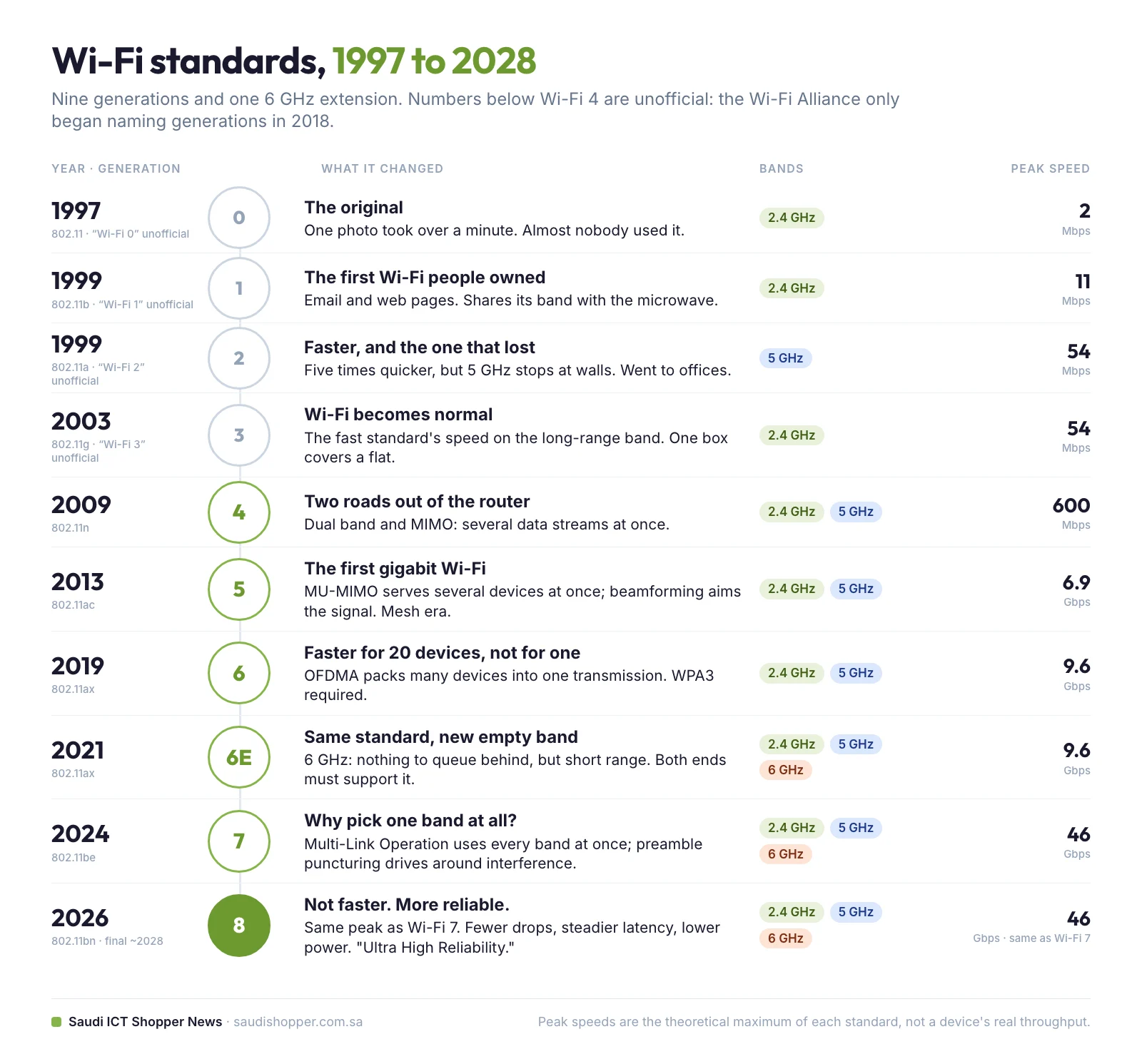
Nine generations, 30 years, one table. The “peak speed” column is the theoretical maximum of the standard, not what any single device reaches. The last column is what each generation actually changed in a home.
| Generation | IEEE name | Year | Bands | Peak speed | What it changed |
|---|---|---|---|---|---|
| “Wi-Fi 0” (unofficial) | 802.11 | 1997 | 2.4 GHz | 2 Mbps | The original. Almost nobody used it. |
| “Wi-Fi 1” (unofficial) | 802.11b | 1999 | 2.4 GHz | 11 Mbps | The first Wi-Fi ordinary people owned |
| “Wi-Fi 2” (unofficial) | 802.11a | 1999 | 5 GHz | 54 Mbps | Fast but short range; went to offices |
| “Wi-Fi 3” (unofficial) | 802.11g | 2003 | 2.4 GHz | 54 Mbps | Fast speed on the long-range band; Wi-Fi became normal |
| Wi-Fi 4 | 802.11n | 2009 | 2.4 + 5 GHz | 600 Mbps | Dual band and MIMO (several streams at once) |
| Wi-Fi 5 | 802.11ac | 2013 | 5 GHz (2.4 kept for range) | 6.9 Gbps | Gigabit speeds, MU-MIMO, beamforming, the mesh era |
| Wi-Fi 6 | 802.11ax | 2019 | 2.4 + 5 GHz | 9.6 Gbps | OFDMA: faster for 20 devices, not for one. WPA3 required |
| Wi-Fi 6E | 802.11ax | 2021 | 2.4 + 5 + 6 GHz | 9.6 Gbps | Same standard, new empty 6 GHz band |
| Wi-Fi 7 | 802.11be | 2024 | 2.4 + 5 + 6 GHz | 46 Gbps | Multi-Link Operation: all bands at once |
| Wi-Fi 8 | 802.11bn | ~2028 (first chips 2026) | 2.4 + 5 + 6 GHz | 46 Gbps (same as Wi-Fi 7) | Ultra High Reliability: no new speed, fewer drops, steadier latency |
First, a note on the names
You will see the early standards called Wi-Fi 0, 1, 2 and 3. Those names do not officially exist. The Wi-Fi Alliance only started numbering generations in 2018, and it started at Wi-Fi 4. Its 2023 generational naming guide says plainly that generations before Wi-Fi 4 will not be given names. Everything earlier was numbered later by the internet, not by the people who write the standard.
So the number on the box is a marketing decision, not a technical one. This guide uses the common names anyway, because they are what you will see in shops and in search results, but it marks them as unofficial.
The one rule that explains every Wi-Fi generation
Low frequencies travel far and pass through walls. High frequencies carry more data but die quickly and are stopped by anything solid. Every Wi-Fi generation is a different answer to that trade-off.
You already know this rule from a neighbour’s party. You hear the deep bass thumping through the wall, but not the words. Bass is low frequency, so it gets through. The vocals are high frequency, so they do not. In Wi-Fi terms, 2.4 GHz is the bass: it reaches the far bedroom and the garden. 5 GHz and 6 GHz are the vocals: brilliant in the same room, useless two floors down.
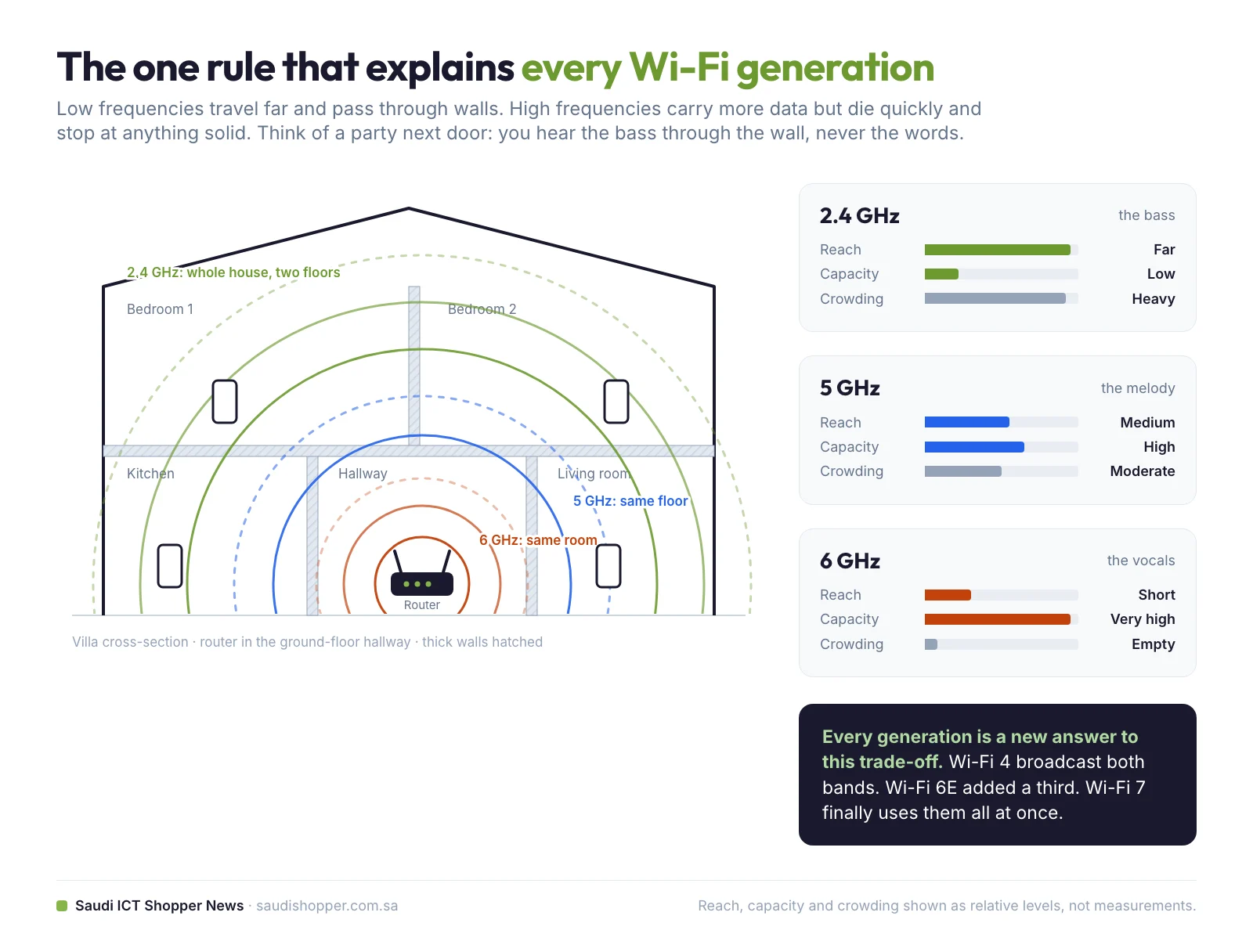
| Band | Reach through walls | Data capacity | Crowding | Best for |
|---|---|---|---|---|
| 2.4 GHz | Far (two floors, garden) | Low | Very crowded: microwaves, Bluetooth, baby monitors, every neighbour | Smart plugs, sensors, the far end of the house |
| 5 GHz | Medium (same floor) | High | Moderate | Laptops, TVs, consoles in the same room or next door |
| 6 GHz | Short (same room, through one light wall) | Very high | Almost empty: only Wi-Fi 6E and 7 devices allowed | VR headsets, 4K/8K streaming, big downloads near the router |
The original standard (1997): 2 Mbps
In 1997 the first 802.11 standard arrived and managed 2 megabits per second. To put that in perspective, a single photo from a modern phone would take over a minute to cross the room. Almost nobody used it, but it set the two things every later generation inherited: the 2.4 GHz band and the idea that a computer could join a network without a cable.
“Wi-Fi 1”, 802.11b (1999): the first Wi-Fi people owned
802.11b ran on 2.4 GHz at up to 11 Mbps, enough for email and web pages, which was all anyone was doing. This is where Wi-Fi became something ordinary people bought.
But 2.4 GHz came with a problem it has never escaped. The band is public property. Anyone can broadcast on it without a licence, so everyone did: cordless phones, baby monitors, Bluetooth headphones and, famously, the microwave oven. A microwave heats food by shaking water molecules at roughly 2.4 GHz, the exact frequency your Wi-Fi is whispering on. That is not interference in a vague sense. It is someone standing next to you with a megaphone, which is why a video call on 2.4 GHz can still stutter when someone reheats dinner in 2026.
“Wi-Fi 2”, 802.11a (1999): faster, and the one that lost
Here is the part most timelines get wrong. 802.11a was not a reply to 802.11b. Both were finalised in 1999, side by side, as two branches of the same idea. This one took the opposite road: up to the 5 GHz band, at 54 Mbps, five times quicker on a band almost nothing else was using. On paper it beat 802.11b in every way.
So why did the slower one win? The wall rule. 5 GHz could not reach the next room the way 2.4 GHz could, and 5 GHz chips were pricier too. The cheaper standard reached shops first and stayed. 802.11a went to offices with access points in the ceiling, and homes stayed on 2.4 GHz. One band goes far, the other goes fast. Wouldn’t it be nice to have both?
“Wi-Fi 3”, 802.11g (2003): the generation that made Wi-Fi normal
802.11g took the 54 Mbps of the fast standard and ran it on the 2.4 GHz band, so you got the speed of one with the reach of the other. Think of it as dropping a sports-car engine into the family estate. Crucially, it kept working with older 802.11b gear, so nobody had to throw anything away.
Broadband was arriving in homes at the same time, and suddenly one box in the hallway covered a whole flat. But look where it was living: back on the crowded 2.4 GHz band, sharing the air with every microwave in the building, and still sending data down a single lane, one stream at a time. The next generation fixed both problems in one go.
Wi-Fi 4, 802.11n (2009): two roads out of the router
Wi-Fi 4 reached 600 Mbps and introduced two changes that still shape the router in your home today.
Dual band. Instead of choosing a frequency, the router broadcasts on 2.4 GHz and 5 GHz at the same time. That is why you often see two networks with almost the same name: same box, two roads out of it. Router upstairs and you are downstairs with the door shut? Your phone falls back to 2.4 GHz to hold the signal. Sitting in the same room downloading a game? You will get 5 GHz.
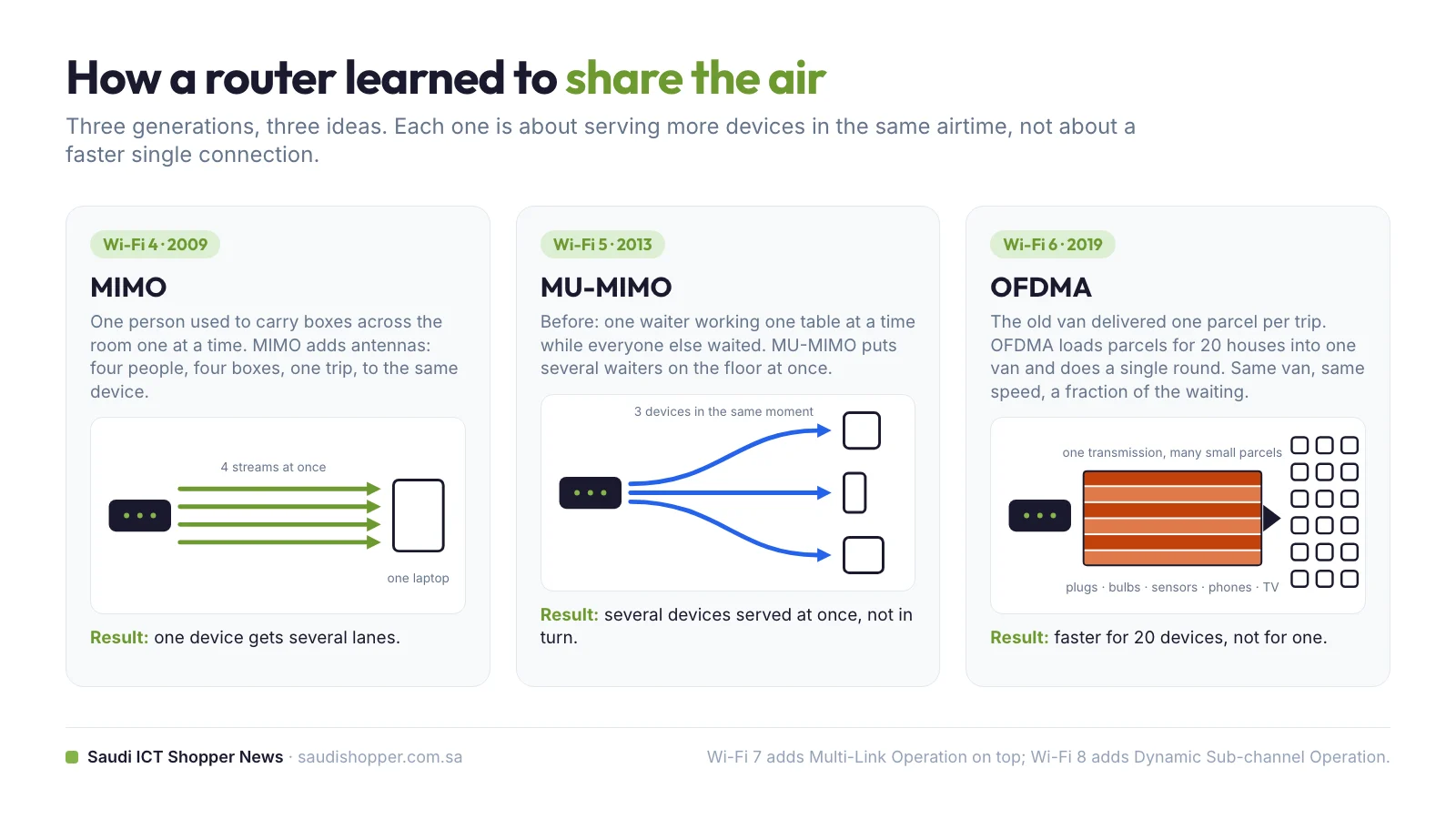
MIMO, multiple input, multiple output. Before it, a router sent one stream of data at a time, like one person carrying boxes across a room over and over. MIMO adds more antennas so several streams travel at once. Four people, four boxes, one trip.
Wi-Fi 5, 802.11ac (2013): the first gigabit Wi-Fi
Wi-Fi 5 was the first generation to talk in gigabits, up to 6.9 Gbps on paper. It concentrated on 5 GHz, while the router kept broadcasting 2.4 GHz alongside it for range. It brought two things worth knowing.
MU-MIMO (multi-user MIMO) is the big one. Before it, a router served devices in turn, like a single waiter working one table at a time while everyone else waited. MU-MIMO put several waiters on the floor at once. Beamforming is the second: instead of spraying signal everywhere like a bare bulb, the router works out where your device is and aims at it, like a torch.
This is also the era when mesh Wi-Fi took over: several small units spread around the house acting as one network, instead of one expensive router shouting from the hallway. In a big home, or a villa with concrete walls, that is still the better answer.
Router speed is not internet speed
The gigabit number on the router box is not your internet speed. Your broadband plan is the pipe coming into your house. The router is the plumbing inside it. A wider set of pipes indoors cannot push more water through a narrow pipe at the street. If you pay for a 100 Mbps fibre plan and buy a 5 Gbps router, you get 100 Mbps, just shared around your home more gracefully. Upgrade the plan first, then the router.
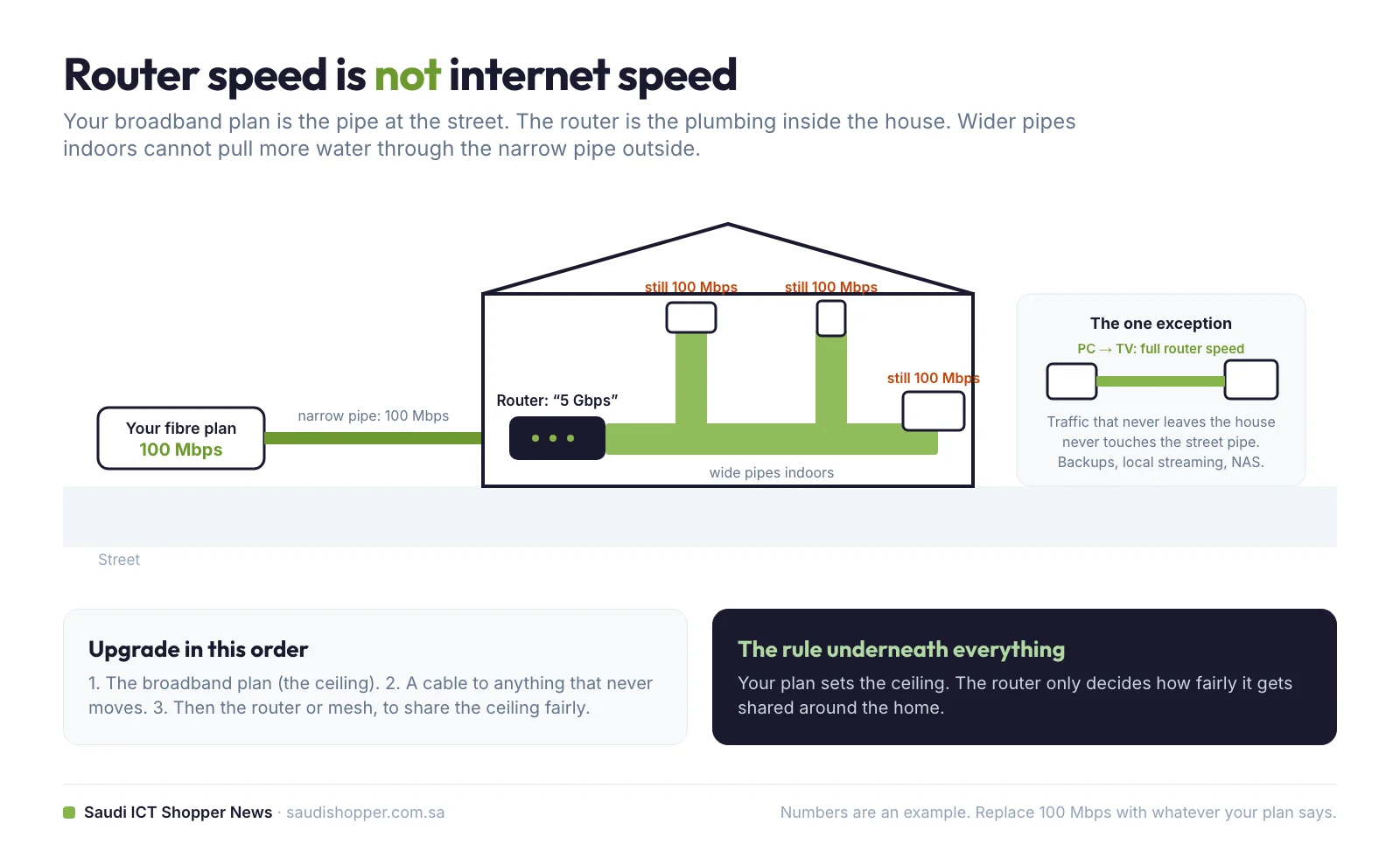
There is one real exception. Traffic that never leaves your house does not touch the street pipe at all. Sending a film from your PC to the TV, backing up a laptop to a drive plugged into the router, or streaming a game from a console to a handheld all run at the router’s own speed. If you do a lot of that, the big number does buy you something.
Wi-Fi 6, 802.11ax (2019): faster for 20 devices, not for one
This is the turning point of the whole story. On paper Wi-Fi 6 reaches 9.6 Gbps. But put one laptop next to a Wi-Fi 5 router and a Wi-Fi 6 router and you would struggle to tell them apart. Wi-Fi 6 is not faster for one device. It is faster for twenty.
Think about what changed in a home between 2013 and now. Two shared laptops became a laptop each, plus phones, a TV, a doorbell, a kitchen speaker and a robot vacuum with opinions. The feature that handles the crowd is OFDMA (orthogonal frequency-division multiple access), and a delivery van explains it. The old way: the van drives to one house, drops a parcel, comes back, loads the next one and drives out again. OFDMA loads parcels for 20 houses into one van and does a single round. Same van, same speed, a fraction of the waiting.
Two more things ride along. Target Wake Time lets small devices agree a schedule with the router and sleep in between, which is why a Wi-Fi 6 sensor can run a year on one battery. And from Wi-Fi 6 onwards, WPA3 security is required for certification: better protection for your password, at no cost to you.
Wi-Fi 6E (2021): the same standard with a new, empty band
Despite the name, Wi-Fi 6E is not a new generation. It is Wi-Fi 6 with permission to use a brand-new band: 6 GHz. That matters because 2.4 GHz and 5 GHz carry decades of accumulated traffic. 6 GHz is a fresh motorway that old devices are not allowed onto, so there is nothing to queue behind.
Three honest warnings. First, the wall rule: 6 GHz sits even higher, so it reaches even less far. Superb in the same room, poor through a concrete wall. Second, and this is the expensive mistake: your phone or laptop has to support 6E too. A new router does not upgrade an old device. Both ends need it, always. Third, 6 GHz is regulated country by country, so what you get depends on where you live.
Saudi Arabia opened the whole 6 GHz band before Europe did
In March 2021 the Communications and Information Technology Commission (CITC, today the Communications, Space and Technology Commission, CST) designated the entire 1,200 MHz of the 6 GHz band, from 5.925 to 7.125 GHz, for licence-exempt use. The Wireless Broadband Alliance said that made the Kingdom the first country in the Middle East, Europe or Africa to open the full band. In practice it means Wi-Fi 6E and Wi-Fi 7 equipment sold in Saudi Arabia gets all seven non-overlapping 160 MHz channels, where many European users get only the lower half.
Wi-Fi 7, 802.11be (2024): why pick one band at all?
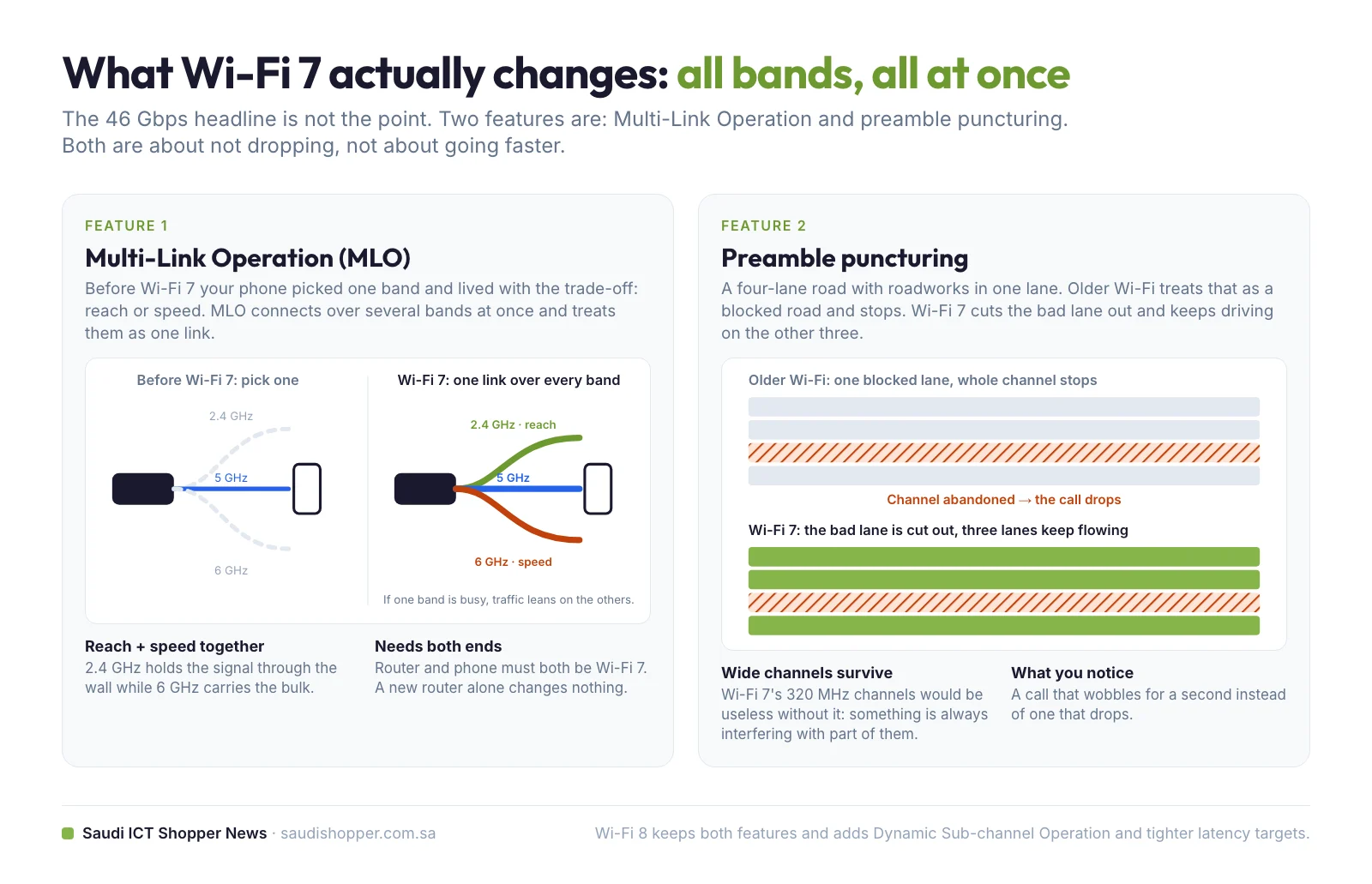
The headline is 46 Gbps in theory, a number you will never see and not the reason Wi-Fi 7 matters. The real feature is Multi-Link Operation (MLO). Until now your device picked one band and lived with the trade-off: reach or speed. MLO lets it connect across several bands at once and treat them as one link. You get the reach of 2.4 GHz and the speed of 6 GHz together, and if one band gets congested the traffic leans on the others.
There is a second trick with an ugly name and a lovely effect: preamble puncturing. Picture a four-lane road with roadworks blocking one lane. Older Wi-Fi treats that as a blocked road and stops. Wi-Fi 7 cuts the bad lane out and keeps driving on the other three. In real life that is the difference between a call that wobbles for a second and a call that drops. Wi-Fi 7 also doubles the widest channel to 320 MHz, which is where most of that 46 Gbps figure comes from, and only the 6 GHz band has room for it.
Wi-Fi 8, 802.11bn (2026 chips, ~2028 standard): the first generation that is not faster
The first Wi-Fi 8 chips are already here. Broadcom announced its BCM6772, BCM6774 and BCM6776 router chips in May 2026, Qualcomm showed its Dragonwing NPro A8 Elite platform for premium routers and enterprise access points early in the year, and TP-Link has previewed an Archer 8 router built on the draft. Consumer routers are expected before the year is out, even though the IEEE is not expected to ratify the standard until around 2028. Early devices run on draft specifications and may need firmware updates later.
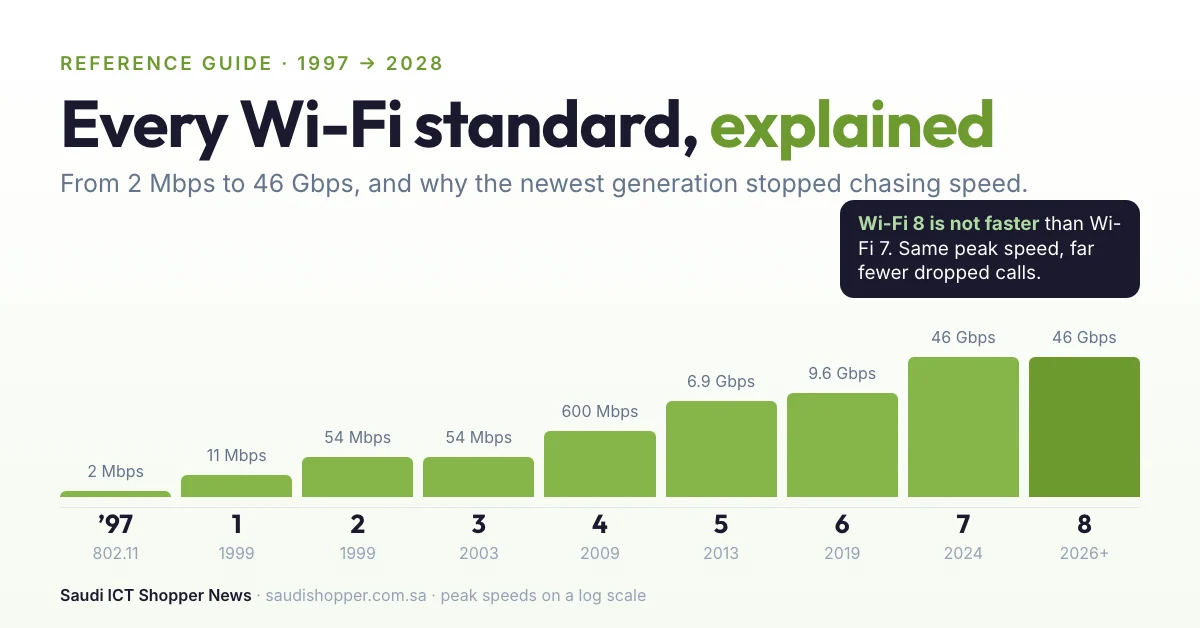
Wi-Fi 8 has the same peak speed as Wi-Fi 7. Not a little faster. The same. For the first time, a new generation is not selling a bigger number. Everything it adds goes into reliability: fewer dropped packets, latency that stays steady instead of spiking, calmer behaviour in a room full of competing signals, and lower power draw. Its working name says it: Ultra High Reliability. One of its features, Dynamic Sub-channel Operation, lets the router hand individual devices their own slice of a channel, which the chip makers say lifts real throughput by more than 20 percent without touching the headline figure.
Think about the difference between a car’s top speed and whether it starts on a cold morning. Every generation before this one sold you top speed. Wi-Fi 8 is the first one selling you the cold morning. That is the right call, because what actually ruins your day has never been megabits. It is the three seconds where the screen freezes and someone says “you’re breaking up”.
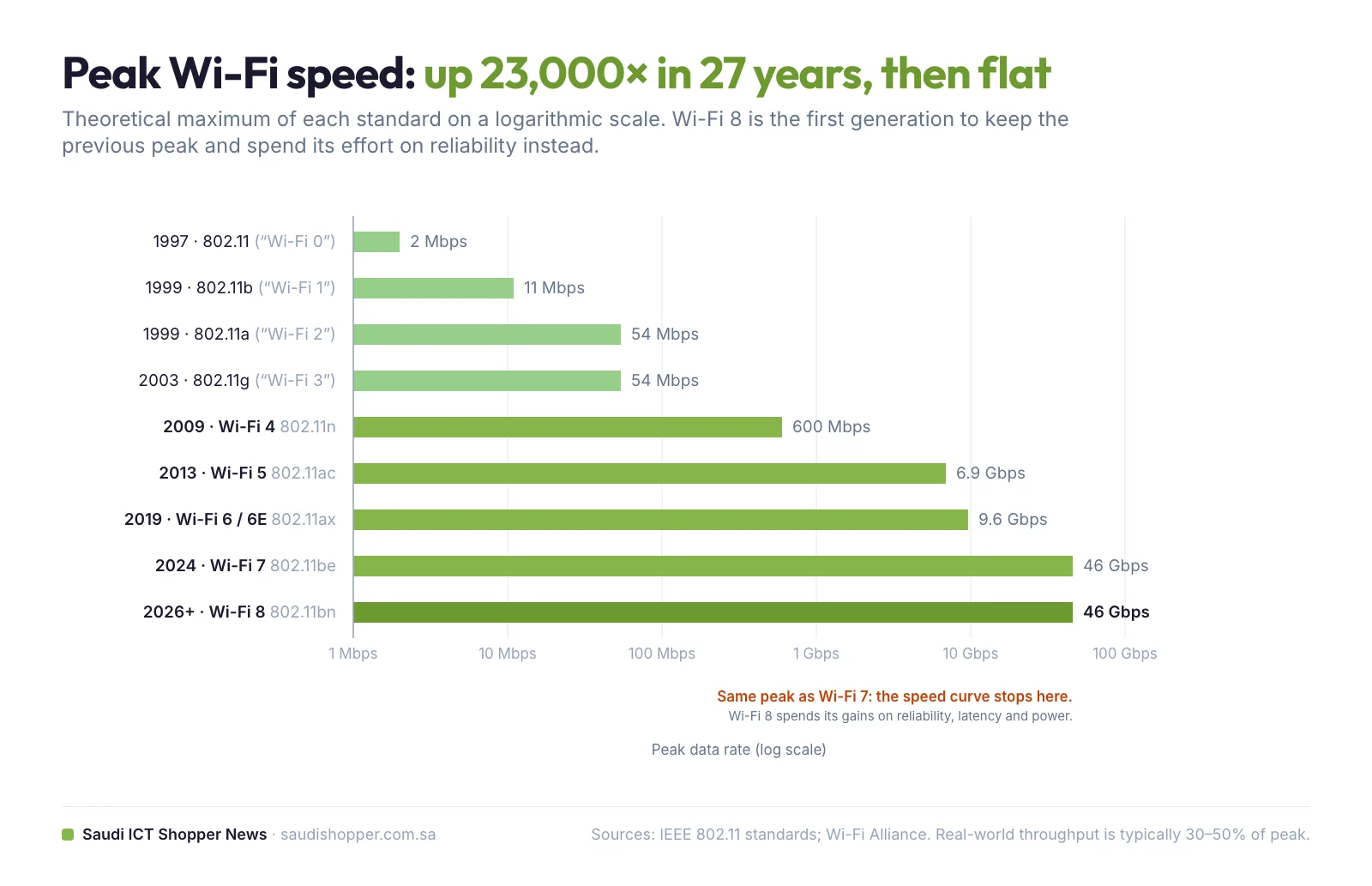
How peak speeds grew, and why the curve has stopped
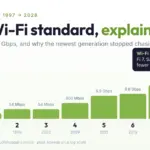
Plotted on a logarithmic scale, Wi-Fi’s peak speed rose about 23,000 times between 1997 and 2024, then went flat. That flat line is the story of this guide: the industry has run out of reasons to chase a number nobody’s broadband plan can fill, and has turned to the things people actually complain about.
Which Wi-Fi should you buy? The cheat sheet
What all of this means when you are standing in a shop in Riyadh, Jeddah or Dammam. Screenshot the card below, or read the rules.
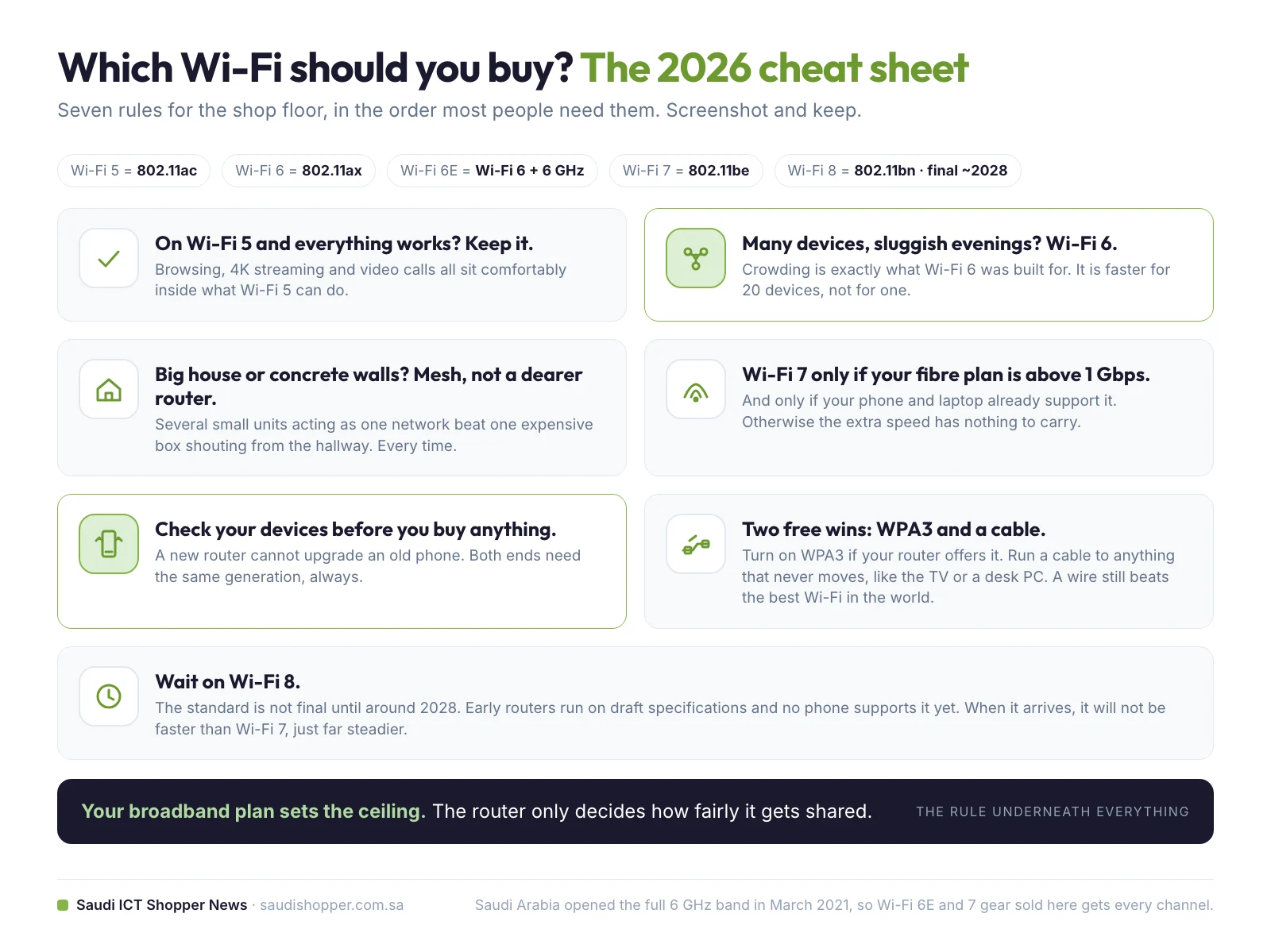
- On Wi-Fi 5 and everything works? You are fine. Browsing, 4K streaming and video calls all sit comfortably inside what it can do.
- Home full of devices and sluggish in the evening? Wi-Fi 6 is your upgrade. Crowding is exactly what it was built for.
- Big house or thick walls? A mesh system beats a more expensive single router. Every time.
- Wi-Fi 7 is worth the money only if your fibre plan is above 1 Gbps and your devices already support it. Otherwise the extra speed has nothing to carry.
- Before you buy anything, check which generation your phone and laptop support. A new router cannot upgrade an old device. Look in the phone’s specifications for “Wi-Fi 6”, “6E” or “7”, or for the 802.11 letters.
- Two free wins. Switch your router to WPA3 if it offers it, and run a cable to anything that never moves, such as a desktop PC or the TV. A wire still beats the best Wi-Fi in the world.
- Wait on Wi-Fi 8. The standard is not final until around 2028, early hardware runs on drafts, and your phone will not support it for a while.
And the rule underneath everything: your broadband plan sets the ceiling. The router only decides how fairly it gets shared.
Wi-Fi glossary: the terms on the box, in one sentence each
- 802.11: the IEEE family of wireless networking standards that every Wi-Fi generation belongs to; the letters after it (b, a, g, n, ac, ax, be, bn) name the version.
- Band: a range of radio frequencies Wi-Fi is allowed to use; today 2.4 GHz, 5 GHz and 6 GHz.
- Dual band / tri band: a router that broadcasts on two or three bands at the same time.
- Channel width: how much of a band one connection uses at once (20, 40, 80, 160 or 320 MHz); wider is faster but needs emptier airwaves.
- MIMO: multiple input, multiple output; several antennas sending several streams at once (Wi-Fi 4).
- MU-MIMO: multi-user MIMO; the router talks to several devices at the same moment instead of in turn (Wi-Fi 5).
- Beamforming: aiming the signal at a device instead of spraying it everywhere (Wi-Fi 5).
- OFDMA: orthogonal frequency-division multiple access; one transmission carries small parcels for many devices at once (Wi-Fi 6).
- Target Wake Time (TWT): a schedule that lets battery devices sleep between check-ins (Wi-Fi 6).
- WPA3: the current Wi-Fi security protocol, mandatory for Wi-Fi 6 certification onwards.
- Wi-Fi 6E: Wi-Fi 6 with access to the 6 GHz band; not a separate generation.
- Multi-Link Operation (MLO): one device connected over several bands at once, treated as a single link (Wi-Fi 7).
- Preamble puncturing: using the clean parts of a wide channel while skipping an interfered slice instead of abandoning the whole channel (Wi-Fi 7).
- Ultra High Reliability (UHR): the IEEE working name for 802.11bn, Wi-Fi 8.
- Mesh Wi-Fi: several units around a home that act as one network with one name.
Frequently asked questions about Wi-Fi standards
No. Wi-Fi 8 (802.11bn) keeps the same theoretical peak speed as Wi-Fi 7, about 46 Gbps. Its improvements go into reliability: fewer dropped packets, steadier latency, better behaviour in crowded airwaves and lower power use. The standard is expected to be ratified around 2028; the first chips shipped in 2026.
Only up to the speed of your broadband plan. The plan is the pipe into your house; the router is the plumbing inside. A 5 Gbps router on a 100 Mbps plan still delivers 100 Mbps. A new router helps when many devices share the connection, when coverage is poor, or for traffic that stays inside the home.
They are the same standard, 802.11ax. Wi-Fi 6E adds permission to use the 6 GHz band, which is almost empty because only Wi-Fi 6E and Wi-Fi 7 devices may use it. 6 GHz carries more data but has shorter range than 5 GHz, and both the router and the device must support it.
Only if your fibre plan is above 1 Gbps and your phones, laptops or consoles already support Wi-Fi 7. Its main feature, Multi-Link Operation, needs support at both ends. For most homes with a plan under 1 Gbps, a good Wi-Fi 6 router or a mesh system solves more problems for less money.
Check the phone’s specification sheet for Wi-Fi 6, Wi-Fi 6E or Wi-Fi 7, or for the 802.11 letters: ax means Wi-Fi 6, ax with 6 GHz means 6E, and be means Wi-Fi 7. Most flagship phones since 2023 support Wi-Fi 6E; Wi-Fi 7 arrived in flagships from 2024.
Yes, in full. In March 2021 the CITC (now CST) opened the entire 1,200 MHz of the 6 GHz band for licence-exempt use, making Saudi Arabia the first country in the Middle East, Europe or Africa to do so. Wi-Fi 6E and Wi-Fi 7 devices sold in the Kingdom can use all seven 160 MHz channels.
Microwave ovens heat food at roughly 2.4 GHz, the same frequency as the 2.4 GHz Wi-Fi band, so a running microwave is a powerful source of interference. Move the device to the 5 GHz or 6 GHz network, or move the router away from the kitchen.
No. The Wi-Fi Alliance started naming generations in 2018 and began at Wi-Fi 4 (802.11n). Its 2023 guidance says earlier generations will not be given names. Wi-Fi 1, 2 and 3 are informal labels the internet applied to 802.11b, 802.11a and 802.11g.
Sources
- Wi-Fi Alliance, Generational Wi-Fi User Guide (April 2023)
- Wireless Broadband Alliance, Saudi Arabia’s CITC designates 1200 MHz of spectrum for licence-exempt use (March 2021)
- The Register, Broadcom gets early start on Wi-Fi 8 (May 2026)
- TechSpot, Wi-Fi 8 is already peeking out at CES 2026 (January 2026)
- Based on the explainer “Wi-Fi 1 to Wi-Fi 8 explained in 10 minutes” by Khaos (馄饨智能).
Last updated October 2026. Infographics by Saudi ICT Shopper News.